Pendrilo Studio, Formatter, Maps, Cover Wrap, Panelhouse, Type & Audiobook Studio · First beta edition
Courier in.
Garamond out.
Desktop programs for people who write books. Studio is where the book gets written. Formatter turns it into the one a reader holds: a print-ready PDF and an EPUB, typeset on your own computer. Maps draws the map for the front of it, Cover Wrap makes its print cover, and Audiobook Studio records you reading it. Panelhouse letters comics, and Type turns your handwriting into a font. Formatter is free.
For Windows. The Mac version is in testing. No account and no cloud: your book stays on your computer.
Pendrilo Studio, Pendrilo Formatter, Pendrilo Maps, Pendrilo Cover Wrap, Panelhouse, Pendrilo Type and Pendrilo Audiobook Studio
First beta edition · version 0.9
No part of your manuscript is uploaded, stored on a server, or used to train anything. All seven run on your own computer. Studio and Formatter save your book as a .pendrilo file wherever you put it, Maps, Cover Wrap, Panelhouse and Type keep each map, cover, comic and font as a file of its own, and Audiobook Studio keeps your recordings beside the project, untouched.
Imports Word, EPUB, Markdown and PDF. Exports print-ready PDF, EPUB, Word and more.
Published by Pendrilo, LLC
10 9 8 7 6 5 4 3 2 1
A Note on This Edition
Most writing software lives in a browser tab and asks for a monthly login to look at your own book. Pendrilo used to work that way too. This edition doesn’t. Studio, Formatter, Maps, Cover Wrap, Panelhouse, Type and Audiobook Studio are real programs you install. They open quickly, they work on a plane, and the book is a file on your computer that you can copy, back up, and keep.
This is a beta. Everything in these pages is built and working today on Windows. Some edges are still rough, which is the point of a beta. If something breaks, tell us and it gets fixed.
Part One
Studio
For the long middle of a book: the months between the first sentence and the last.
Pendrilo Studio keeps the manuscript, the outline, the people and places, the timeline and the publishing paperwork in one window, with the Formatter built in for when the words are done.
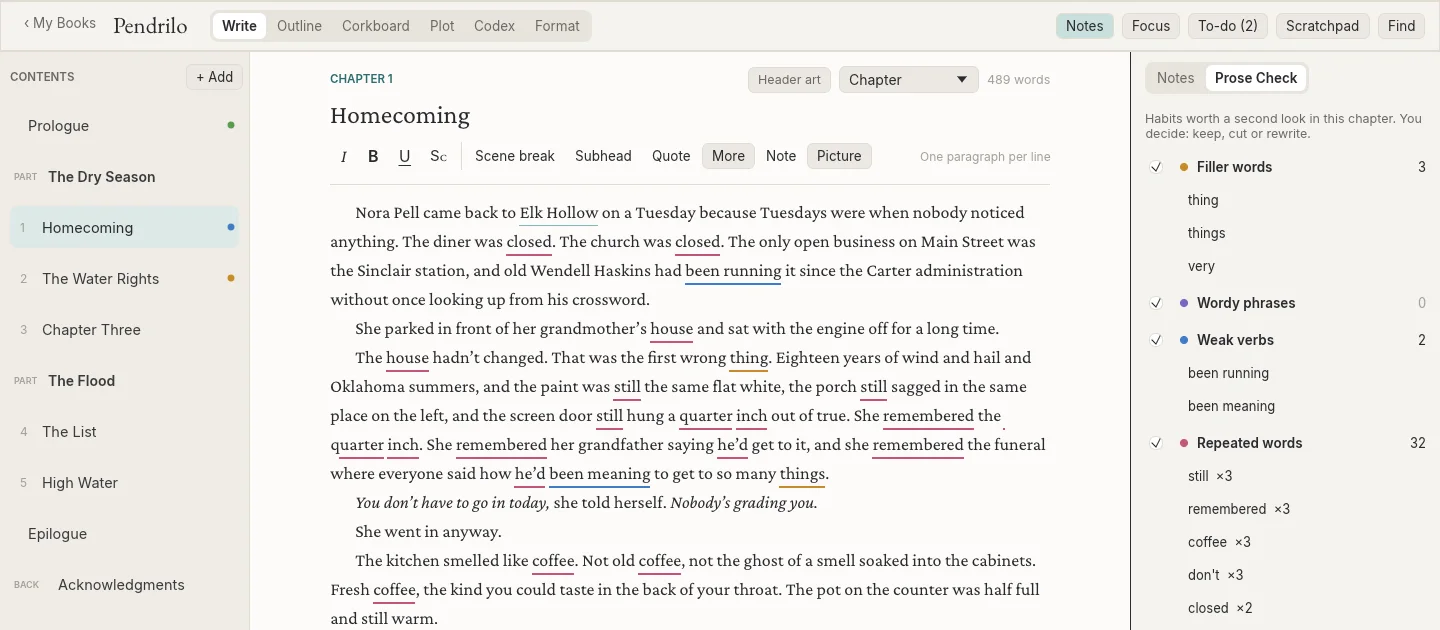
Plate 1
Write
Index of the smaller things
Studio does a great deal that doesn’t fit on a plate. Here it is the way a book would list it.
B
Book goals, finish-by date, words a day needed
Book in a sentence, see Book goals
C
Comments, on any passage; they survive edits around them
Compare With Now, words cut and added since any version
Corkboard, a card per chapter; drag to reorder
Covers, on your shelf of books
E
Echo Report, your crutch words across the whole book
F
Find in the Book, every match by chapter; Replace All
Focus, nothing but the page
L
Labels, coloured tags for chapters
Leave a chapter out, kept in the project, not in the book
M
Manuscript format, Courier, double-spaced, title page, for agents
P
Plot board, plot lines by chapter; quiet subplots flagged
Portraits, for characters and places
Pronunciations, so Read Aloud says names right
R
Relationship map
Revision passes, untouched, touched, added
S
Scratchpad, up to four
Screenplays, film and television; Fountain and Final Draft
Story Bible, the whole world as a printable PDF
Story checks, facts that disagree, threads never paid off
T
To-do list
Typewriter scrolling
U
Universes, characters shared across a series
V
Version history, named versions, nothing lost
W
Word sprints
Writing log, streaks and a thirteen-week map
Part Two
Formatter
For the day the words are done and it has to look like a book.
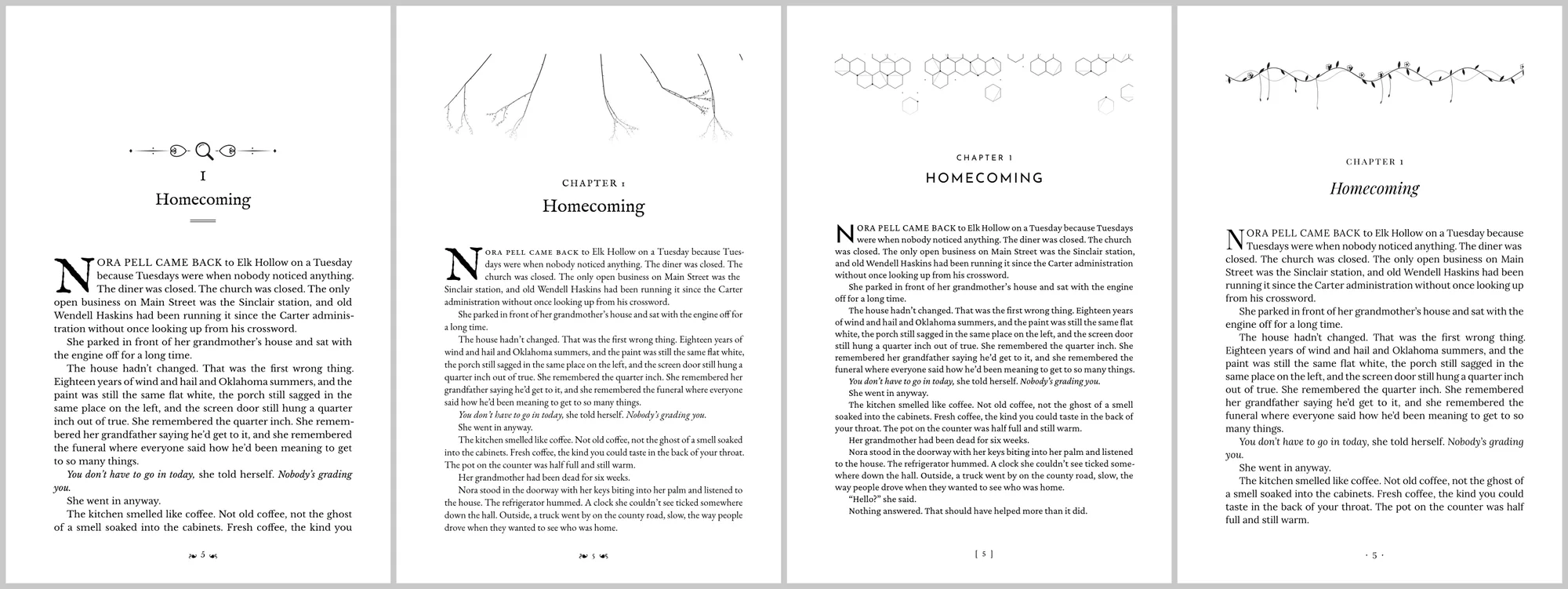
Bring in a Word file, an EPUB or a Pendrilo project. Pick a design. Formatter sets the pages with real typesetting: hyphenation, no stranded lines at the top or bottom of a page, drop caps, small caps, running heads. Then it writes the print PDF and the EPUB in one go.
Free. Not a trial, and no watermark.
65
book designs, sorted by genre: literary, thriller, romance, mystery, contemporary, non-fiction, children’s, fantasy and science fiction, horror, historical and poetry. Every part of each is yours to change.
Specimens
The details a reader never names but always notices. Click any specimen to see it larger.
The arithmetic it does for you
The inside margin of a printed book has to grow as the book gets thicker, or words vanish into the binding. KDP publishes a table for it. Formatter reads your page count and sets it. Try it:
- Inside margin
- 0.625″
- Spine width
- 0.780″
KDP paperback figures. Check the final numbers in KDP’s previewer before you publish.
Also in the press room
- Print PDF and EPUB from one click
- Trim sizes for KDP and IngramSpark, large print and hardcover
- Your own fonts, alongside a bundled library
- Tables, callouts and sidebars for non-fiction
- An index, found by the program, not typed by you
- Dedication, epigraph, Also By and About the Author pages
- Chapter subtitles and thirteen contents-page styles
- Pictures, full-page and in the text
- Screenplays and agent-ready manuscripts
- Version history, so a bad change is one click from gone
Part Three
Maps
For the page before chapter one, where the reader looks to see where they are.
Pendrilo Maps draws the map for the front of your book: coastlines, mountains, forests, towns, rivers and roads, in a hand-inked style. Click New World and a whole map appears. Everything on it can be moved, renamed or redrawn. Then send it straight into the book.
New in the beta
A reader turns to the map before the first page, and back to it every time the story moves. Most map tools start with a screen. Pendrilo Maps starts with the page it will be printed on: 5 × 8, 5.5 × 8.5, 6 × 9 or 8.5 × 11, as one page or a two-page spread, with the fold marked so no name falls into it.
New World makes one island, scattered islands, a mainland or a coastline, then fills it with ranges, forests, rivers, roads, towns and their names. Roll again until one feels right, then rename the places after your own.
33
hand-inked symbols: mountains, pines, castles, ruins, lighthouses, ships and sea serpents, and for darker books, graveyards, scarecrows, dead trees and standing stones. No two mountains come out alike.
Four looks and a grid for game night
One click restyles the whole map: paper, ink, sea and lettering. Click a map to see it larger.
- Ink
- Black on white, for a map printed inside a book.
- Parchment
- Warm paper and brown ink, for ebooks, covers and the game table.
- Chart
- Pale blue sea and cream land, like an atlas page.
- Dread
- Cold grey paper, heavy ink and one red. For horror.
Also on the drawing table
- Fantasy or horror place names, suggested as you go
- Names that curve along a coast and tilt with a range
- Rivers that narrow to their source, roads, trails and borders
- Frames, a title box, compass rose and scale bar
- Hex or square grids on Letter, Tabloid, A4 and A3 sheets
- Vector PDF, or PNG and JPEG at 300 dpi
- A seed to share: the same seed makes the same world
- Undo for everything, and it saves itself as you go

Part Four
Cover Wrap
For the author with a front cover and a paperback that needs the rest of it.
Pendrilo Cover Wrap turns your front cover into the full cover a paperback needs: back, spine and front on one sheet, sized exactly for your page count and paper, with bleed, ready to upload to KDP or IngramSpark.
New in the beta
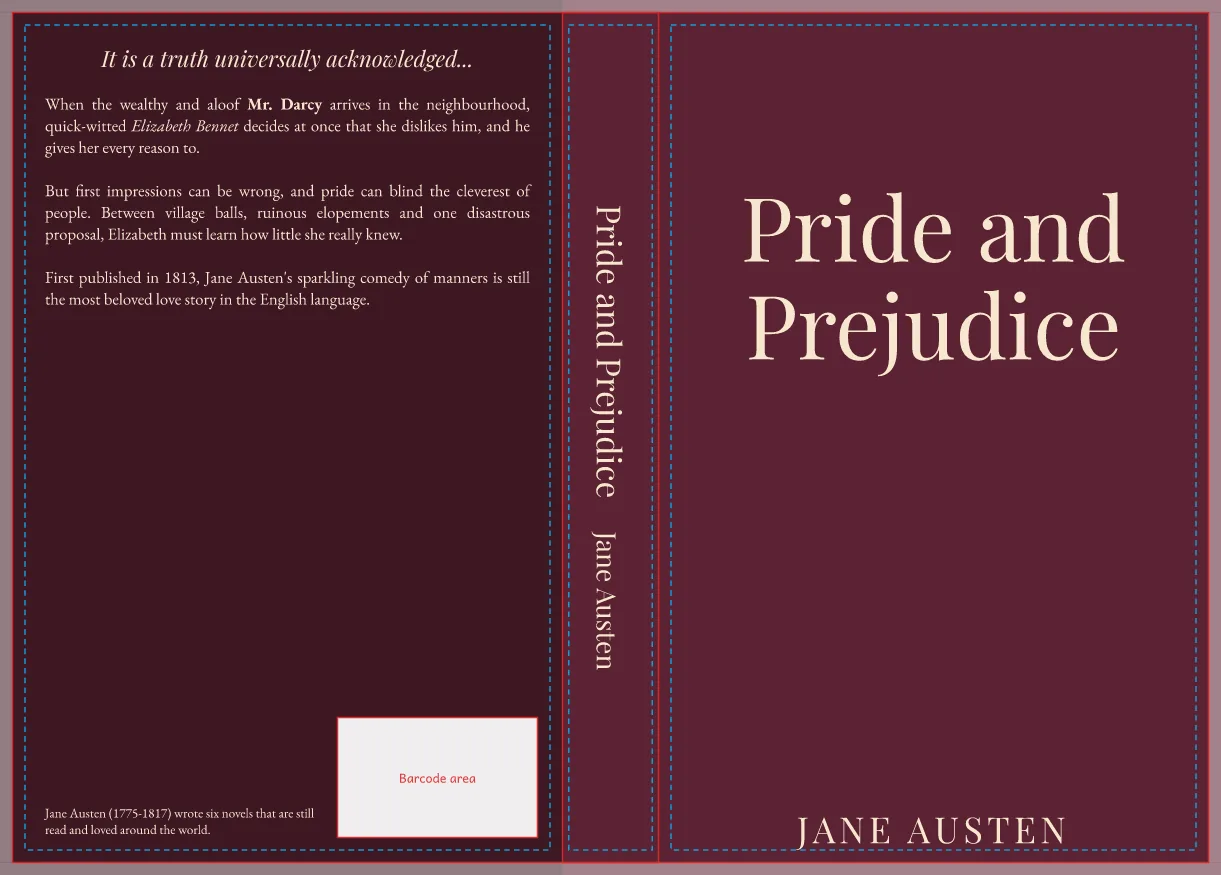
- 1The book. Trim size, paper and page count, or Read from Book PDF takes them from your interior. In Formatter or Studio, Book → Make the Cover… sends them over.
- 2The pictures. Your front cover, a back cover picture if you have one, or one full-wrap picture for the whole thing. Cropped to fill, never stretched.
- 3The back. Headline, blurb, author photo and bio, each with its own style. Drag any of them anywhere on the back.
- 4The checks. Blurry pictures, words outside the safe area, anything over the barcode box, a spine too thin for its title: each with Show me.
- 5Export. The print PDF for KDP, and the front alone as your ebook cover.

Part Five
Panelhouse
For the comic with finished art and nothing in the balloons yet.
Panelhouse letters your comic from its script: every balloon, caption and sound effect, set the way a professional letterer would. Then it publishes the book everywhere at once: a print PDF for KDP or IngramSpark, the wraparound cover, a fixed-layout ebook, webtoon strips and a CBZ.
New in the beta
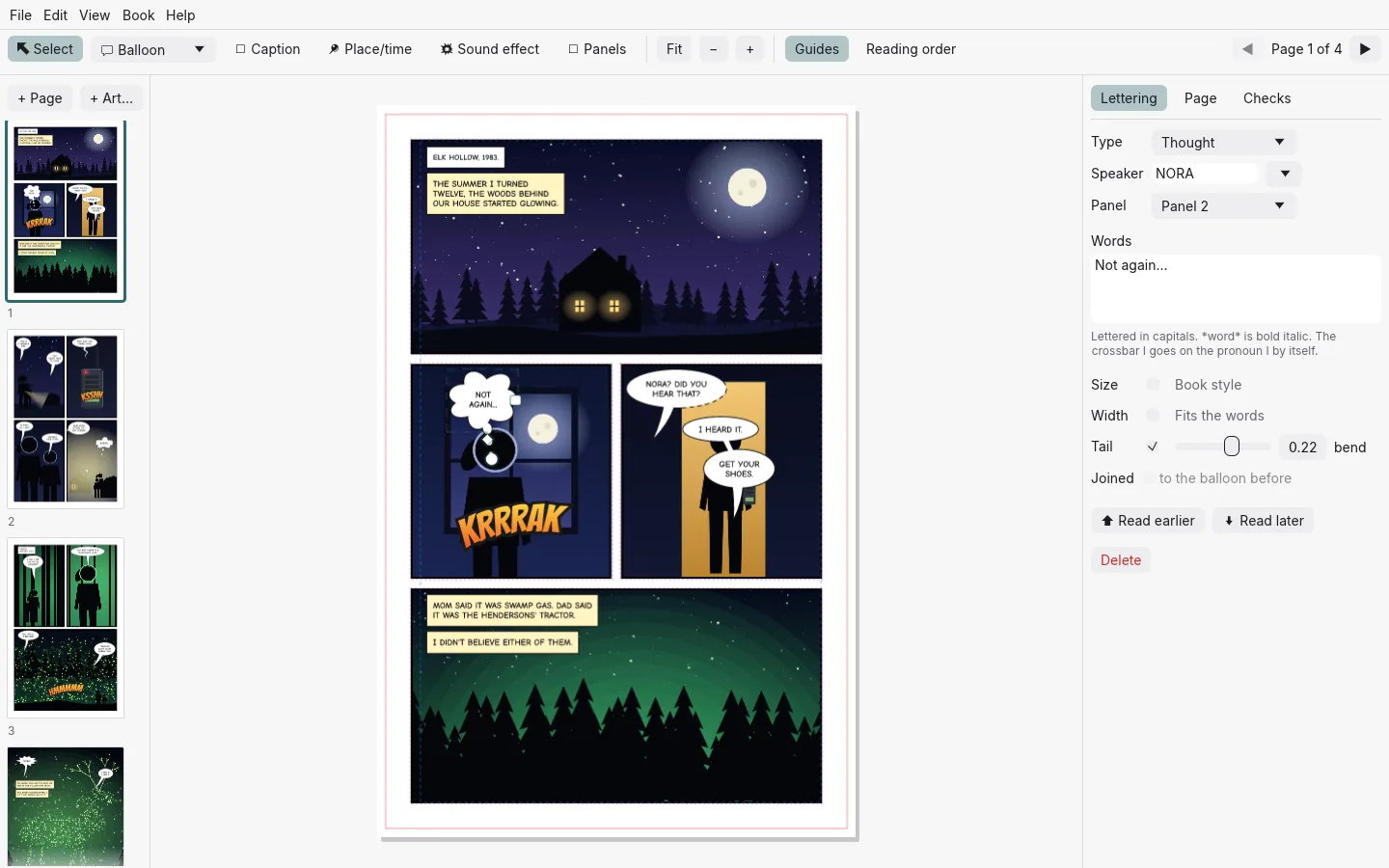
- 1The script. Book → Import Script… reads a standard comic script (PAGE ONE, PANEL 1, NORA: …) and a folder of page art, and finds the panels the artist drew.
- 2The lettering. Speech, thought, whisper, shout, radio and off-panel balloons, captions and place boxes, each grown to fit its words. Drag a tail to the speaker’s mouth.
- 3Sound effects. Big lettering that arcs, bulges, tilts and fades, drawn as sharp vector art.
- 4The checks. Balloons read out of order, lettering near the trim or too small to read, art below 300 DPI, and a spellcheck that knows your characters’ names.
- 5Publish. The KDP or IngramSpark PDF, the wraparound cover, a fixed-layout EPUB, webtoon strips and a CBZ. Manga reads right to left, and translations are lettered over the same art.

Part Six
Type
For the author whose handwriting belongs in the book.
Pendrilo Type turns your handwriting into a real font. Print a template, write on it, scan it or take a photo, and the pages become a font that installs on Windows and Mac and works in Word, Canva, Cricut Design Space and Pendrilo Formatter.
New in the beta
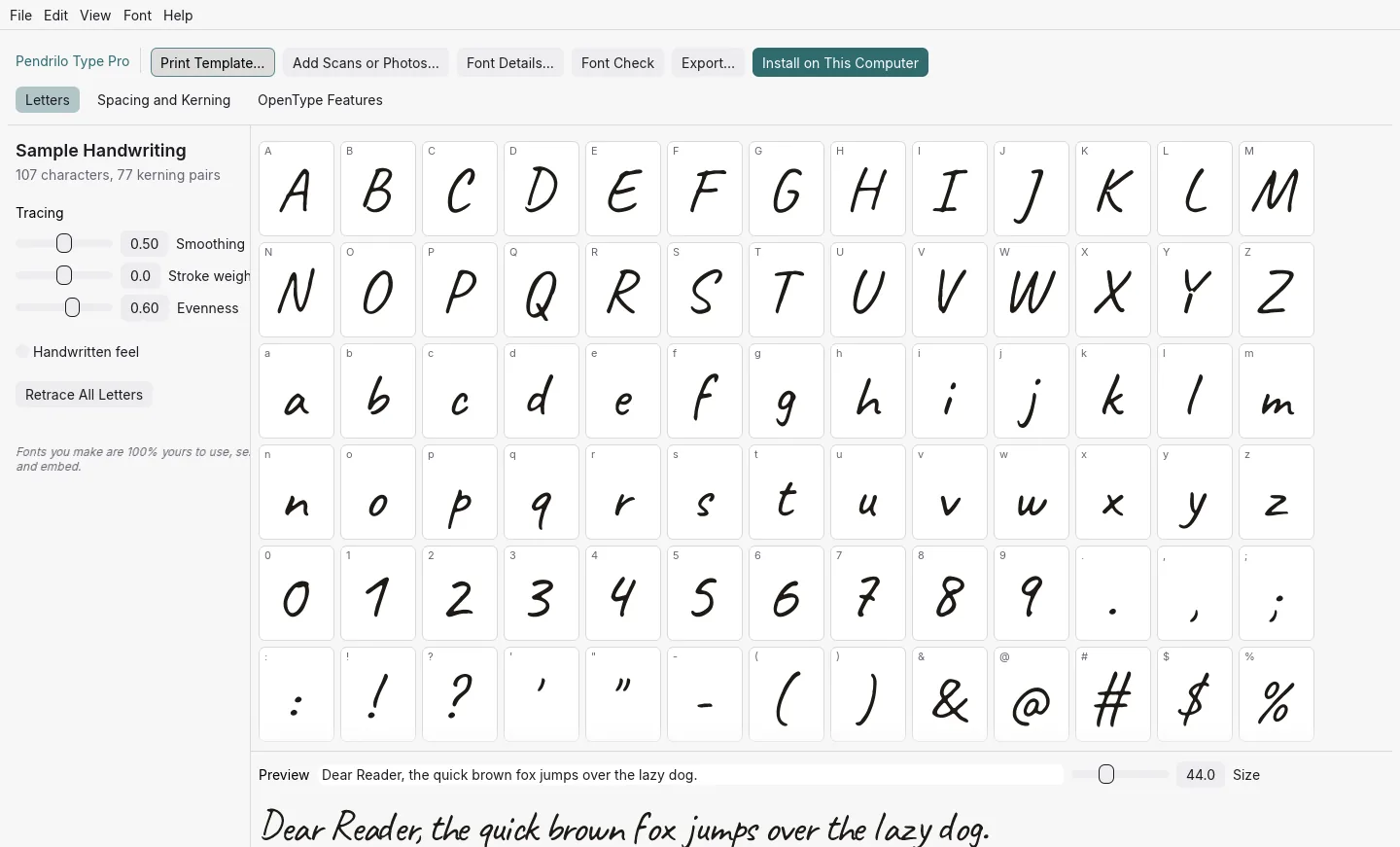
- 1Print the template. US Letter or A4. Write one letter in each box, with any pen you like.
- 2Scan or photograph it. Add Scans or Photos… takes the pages in any order, at any angle, even upside down.
- 3Make My Font. The pages are straightened, the guide lines removed, and every letter traced, sized, spaced and kerned.
- 4Check every letter. Nudge, resize or respace any of them. Handwritten feel rotates your versions of a letter, so “book” never looks stamped.
- 5Use it. Install on This Computer, or export OTF, TTF and WOFF2. Pro adds a point editor and kerning.
Part Seven
Audiobook
For the author who wants to read the book to the listener in their own voice.
Pendrilo Audiobook Studio records your audiobook and gets it past ACX the first time. Bring in the manuscript, read it to the mic a sentence at a time, and export files that meet every ACX requirement, checked before you upload. For authors who narrate their own books, and narrators hired to read someone else’s.
New in the beta
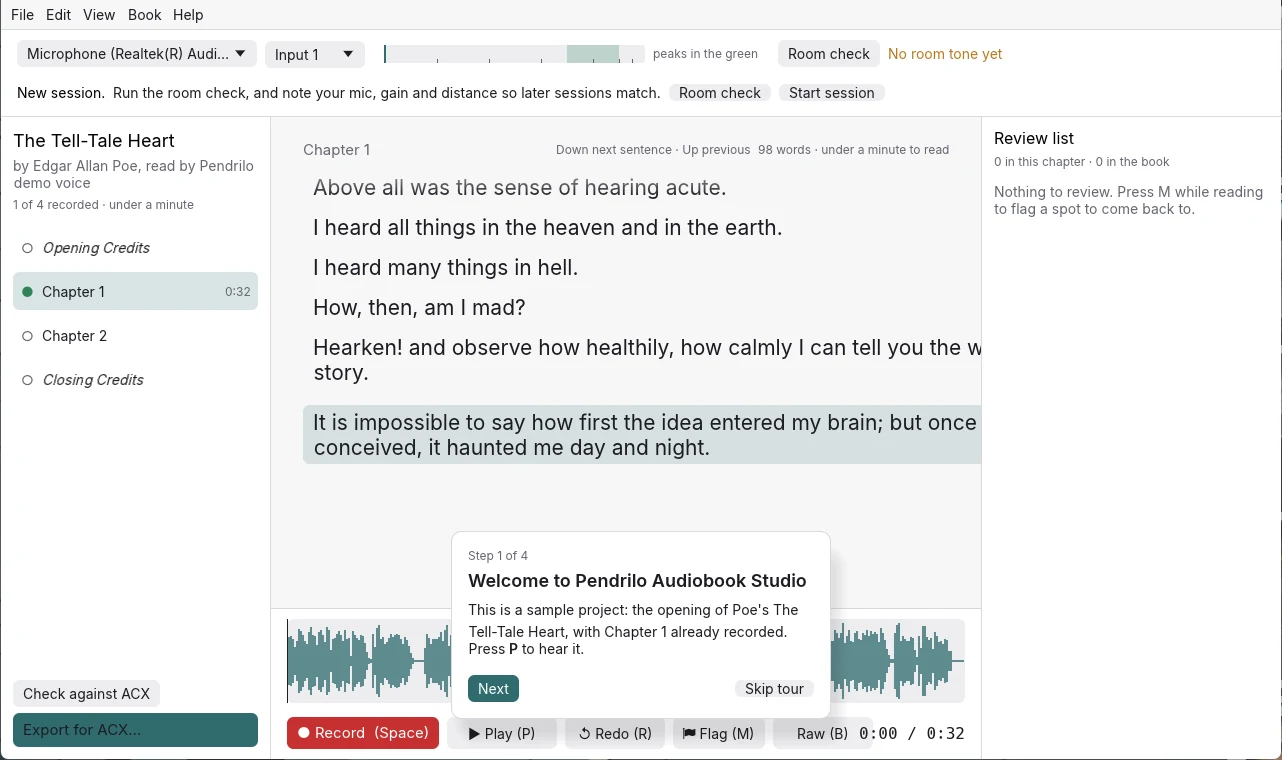
1
program instead of an audio editor, a chain of plugins, a separate ACX checker and a stack of retakes to splice by hand.
In the booth from manuscript to upload
- 1
Bring in the manuscript
Word, Markdown, plain text or a Pendrilo project, split into chapters for you. Each chapter opens with its spoken heading, and the opening and closing credits are written from the book’s details. Revise the book and re-import it: only the sentences that changed are flagged for a re-read. - 2
Check the room
Ten seconds of silence at the start of a session gets a plain verdict: good, borderline, or too noisy, with the likely cause (hum, hiss, rumble, a noise that comes and goes). That room tone pads every chapter. Session notes keep your mic, gain and distance, so next week sounds like this week. - 3
Record, punch and roll
The script sits on screen one sentence per line. Fluff a line? Press R: it plays the last three seconds and you pick up from there. Click any sentence to punch in. The meter shows the target zone and warns when you’re too hot or too quiet. - 4
Master it automatically
Rumble filter, gentle noise reduction from your own room tone, de-esser, mouth clicks removed, breaths softened (never cut), light compression, level set to −20 dB RMS, peaks held at −3.5 dB. Press B at any spot to hear raw against mastered. - 5
Check it against ACX
Before export, every file is measured and gets a pass or fail line: level, peaks, noise floor, room tone at the head and tail, length, format. Click a line to jump to the problem. Where a fix is safe, it’s one click. - 6
Export for ACX
192 kbps constant bit rate mono MP3 at 44.1 kHz, numbered and named for upload. Chapters over two hours are split at a pause. Opening and closing credits get their own files, and a retail sample is cut from Chapter 1.
Hands free eyes on the page
You shouldn’t have to look away from the script to drive the recorder. Everything you do in a take is one key, and every key can be mapped to a foot pedal.
Edits never touch the raw recording. Each cut is crossfaded at the quietest moment nearby, marked on the waveform, and undone with Ctrl+Z. Recordings back up after every take.
- Space
- Record and stop. Carries on from the end of the chapter.
- R
- Redo this sentence: three seconds of pre-roll, then record over it.
- Down / Up
- Next or previous sentence. While recording, Down marks where each sentence starts.
- Click a line
- Set the punch-in point there.
- M
- Flag this spot for the review list.
- B
- Raw or mastered, at the same spot.
−20 dB
RMS per chapter, inside ACX’s −23 to −18 window.
−3.5 dB
True peak, a margin under ACX’s −3 dB.
1.5 s · 3 s
Room tone at the head and tail of every file.
192 kbps
Constant bit rate mono MP3, 44.1 kHz.
ACX’s requirements as published on help.acx.com in October 2026. Passing these checks means the files meet the technical spec; ACX’s reviewers still listen to the performance.
Part Eight
One book, seven programs
Formatter is the press. Studio is the whole house: the desk, the filing cabinet and the press. Maps is the drawing table by the window, Cover Wrap is the bindery, Panelhouse is the letterer’s desk for comics, Type is the type foundry, and Audiobook Studio is the recording booth down the hall. Studio and Formatter open the same .pendrilo file, so you can start with one and move to the other without losing a thing, and Maps sends its map into whichever one holds the book.
- 1Draw it in Pendrilo Maps, at your book’s page size.
- 2Send to Pendrilo. The map waits for the book, even if Formatter or Studio isn’t open yet.
- 3Add as a map page in Formatter or Studio. Studio can add the map’s place names to the Codex as well.
Choose Formatter, free, if you already write in Word or Scrivener and need the finished files.
Choose Studio if you want to write the book here too.
Add Maps if the book needs a map at the front, or the game table needs one.
Add Cover Wrap if you have a front cover and need the full paperback cover: back, spine and front, for KDP or IngramSpark.
Add Panelhouse if you make comics: it letters the finished art from your script and publishes it in print, as an ebook and as a webtoon.
Add Type if you want your handwriting, your series title lettering or your ornaments as a font, for the book, the cover or the Cricut.
Add Audiobook Studio if you’ll narrate the audiobook yourself, or read books for other authors. It stands on its own and doesn’t need the others.
Part Nine
Galley copies
Publishers send early copies of a book to readers before it’s finished. This is the same idea. Join the beta and you get Studio, Formatter, Maps, Cover Wrap, Panelhouse, Type and Audiobook Studio now, on Windows, while the last corrections are being made. Tell us what you find.